Summary of WiFi Low-Power Strategy Implementation Mechanisms
- 10 May, 2020
WiFi Low-Power Operating Modes
Default operating mode (without low-power enabled): The STA keeps its RF receiver open most of the time, waiting and listening for its own wireless data packets, and switches to RF transmit state when data needs to be sent.
- In this scenario, the AP directly sends all frames destined for this STA to the STA without buffering them.
- In this case, most of the STA’s RF circuitry needs to remain on, consuming significant power.
Low-power operating mode enabled: The STA informs the AP that it is about to enter low-power mode, and the AP then buffers data frames for this STA. The STA wakes up periodically, learns from the TIM Field in the Beacon Frame whether the AP has buffered data for it, and if so, sends a PS-Poll frame to retrieve these buffered frames. After completion, it re-enters the low-power state.
- When the STA is in a low-power state, upon receiving data destined for it, the AP does not send it directly to the STA but buffers it first, waiting for the STA to send a PS-Poll to retrieve it or for the STA to re-enter wake-up mode (Power management bit set to 1).
- In low-power mode, most of the STA’s RF circuitry only has its clock active for most of the time; the receiver or transmitter only needs to operate when the STA periodically wakes up for data interaction, thus saving significant power.
- For the application layer, setting the STA into low-power mode is typically done through interfaces provided by the WiFi vendor.
Overall Workflow of Low-Power Mode
When the STA is about to enter low-power operating mode, it sets the Power Management bit of the frame sent to the AP to 1, indicating its imminent entry into low-power mode.
Upon receipt, the AP buffers all unicast data frames destined for this STA and sets a flag in the TIM Field of its periodic Beacon Frame, indicating that the AP has buffered frames for this STA.
The STA periodically wakes up, waits to receive a beacon frame from the AP, and learns from the TIM information within the beacon frame whether it has buffered frames.
- If there are no buffered frames for it, the STA re-enters sleep state.
- If there are buffered frames for it, the STA sends a PS-Poll frame to the AP to request its buffered frames. Upon receipt, the AP sends the buffered frames to the STA.
After the STA has received and locally processed all frames buffered on the AP, it can re-enter sleep state.
More Data
In the low-power mode workflow described above, a question arises: what if the AP buffers multiple frames for the STA, rather than just one, while the STA is sleeping? This is where the More Data flag comes into play.
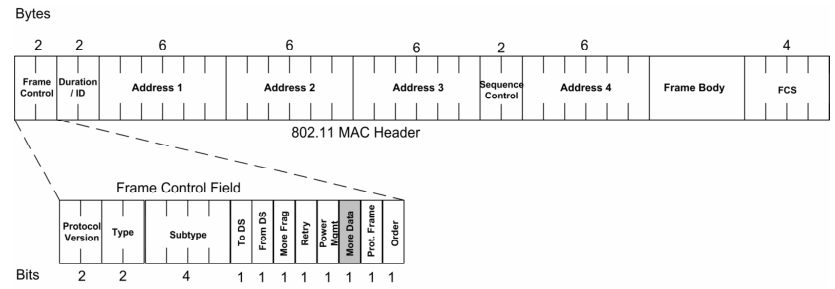
More Data is a flag within the Frame Control Field of the MAC Frame Header.
When the STA sends a PS-Poll Frame to the AP, the AP responds with a Data Frame, setting its More Data flag according to the situation:
- If the AP has more buffered frames, the flag is set to 1. In this case, the STA must continue to send PS-Poll Frames, waiting to receive the next buffered Data Frame and checking the More Data flag, until all buffered Data Frames have been read. The More Data flag of the last Data Frame will then be set to 0.
- If the AP has no more buffered frames, the More Data flag is 0. Concurrently, the AP’s Beacon Frame TIM will no longer indicate buffered frames for this STA. Upon receiving this Data Frame, the STA will understand that the AP has no more frames buffered for it, and it can then re-enter the sleep state.
DTIM
TIM: Traffic Indication Map;
DTIM: Delivery Traffic Indication Map;
Every Beacon Frame contains TIM information, but not every beacon frame contains DTIM information.
The TIM information element describes unicast frame information buffered by the AP for each STA. A sleeping STA can use TIM information to determine if the AP has unicast frames buffered for it.
The DTIM information element, on the other hand, describes multicast/broadcast frames buffered by the AP.
- When all STAs connected to the AP are continuously in a Wakeup state, meaning no STA is in low-power mode, the AP directly transmits all broadcast/multicast frames without buffering them.
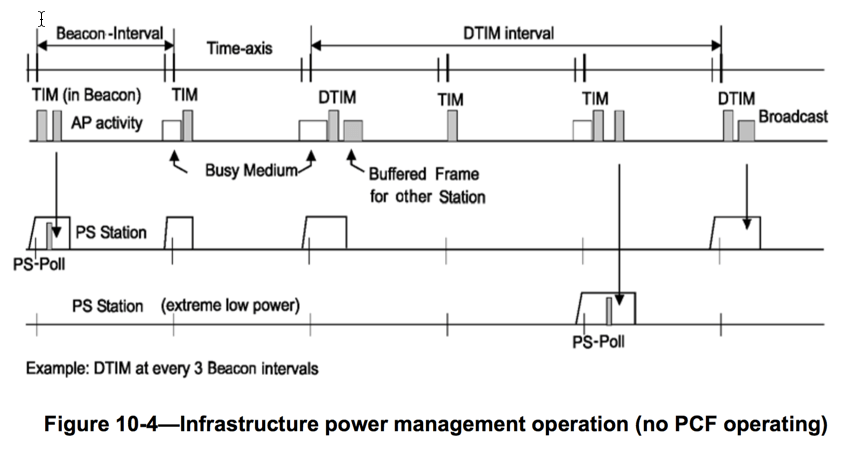
- As soon as one STA connected to the AP enters low-power mode, the AP buffers all broadcast/multicast frames. After a Beacon frame containing DTIM information is transmitted, these buffered broadcast/multicast frames are then broadcast to the entire network. Once broadcast, new broadcast/multicast frames will continue to be buffered until the next DTIM period arrives for transmission.
- As shown in the figure below, if the AP has buffered broadcast and multicast frames, it will transmit these buffered frames together after each DTIM Beacon frame is sent. Therefore, if the STA’s application is interested in broadcast and multicast frame content, it needs to remain awake during the DTIM Beacon Frame to receive these broadcast frames.
The organizational structure of TIM and DTIM information elements is identical:

- DTIM Count: This is a countdown value indicating how many more Beacon Frames will follow before a DTIM Beacon Frame. If this value is 0, the current Beacon Frame is a DTIM Beacon and contains DTIM information; otherwise, it’s a regular Beacon containing TIM information.
- It is a countdown value, counting down from the DTIM Period to 0, and then repeating the cycle.
- DTIM Period: Indicates how often (in terms of Beacon Frames) a Beacon Frame contains DTIM information. It is a fixed number that can be configured in the AP’s settings interface.
- Bitmap Control: 1 byte
- bit0: If it’s TIM information, this bit is 0. If it’s DTIM information and the AP has buffered broadcast/multicast frames, this bit is 1; otherwise, it remains 0.
- Bits 7-1: Combined with the Partial Virtual Bitmap, these bits indicate for which STAs the AP has buffered unicast frames.
- Partial Virtual Bitmap: 2 bytes
- Combined with the high 7 bits of the Bitmap Control, these bits indicate for which STAs the AP has buffered unicast frames.
- For the specific algorithm, refer to Annex O of ‘802.11-2012’.
Another Low-Power Mode Implementation Strategy
The previously described method of including a frame buffering flag in the Beacon’s TIM combined with PS-Poll to retrieve buffered frames is not the only low-power implementation strategy provided by the 802.11 specification.
Some vendors also offer an alternative low-power implementation strategy that does not use PS-Poll. The specific implementation process is as follows:
- When the STA is about to enter low-power mode, it sends an empty Data frame to the AP, setting its Power Management bit to 1, indicating that this STA intends to enter low-power mode.
- Subsequently, the AP buffers frames destined for this STA and broadcasts this information in the Beacon’s TIM field.
- After the STA periodically wakes up, it does not need to wait for or pay attention to the contents of the TIM flag in the Beacon Frame. Instead, it directly sends another empty Data frame to the AP, setting its Power Management bit to 0, indicating its exit from low-power mode.
- Upon receiving this empty Data Frame, the AP stops buffering frames for this STA and immediately sends all previously buffered frames for this STA to it.
- If the AP had not previously received buffered frames for this STA, it does nothing.
- After receiving all buffered frames, the STA sends another empty Data frame with the Power Management bit set to 1, re-entering low-power mode.
References:
- ‘CWAP WLAN ANALYSIS’ Chapter 4;
- How to: Get the Most from 802.11 Multicasting
- 802.11 – TIM and DTIM Information Elements