如何把PT格式的模型转换为TFLite/LiteRT模型?
- 29 Apr, 2026
之前在尝试把Ultralytics的YOLOv8模型运行在Android手机上的过程(参考总结Android Flutter项目中YOLO模型的执行流程)中,直接使用了YOLO模型的export接口即可实现把该模型导出为ONNX、TFLite等格式。但是如何我们在开发过程中遇到的模型没有官方所提供的export接口,如何能够把pt格式的模型文件转换为TFLite,从而方便的部署在Android手机上呢?
因此,本文尝试解决这样的问题:如何把一个通用的 PyTorch 模型权重(.pt)文件,通过模型转换处理,变成在 Android 端侧能跑的 TFLite 模型文件(.tflite)?
Google的AI Edge Torch/Litert
针对以上所提出的问题,一个比较流行的解决方案是:
- PyTorch (.pt) → ONNX: ONNX 是模型交换的通用格式,所以这一步转换相当于是把模型文件脱离了 PyTorch 的框架限制。
- ONNX → TensorFlow (SavedModel): 这是一个转译过程,从ONNX的生态语言转换为TensorFlow生态,确保目标平台(即Google 手机APP)能正确的识别模型文件中的算子。
- TensorFlow → TFLite: 这有点类似于 Linux 下的
strip和objcopy,这一步操作会进行常量折叠、算子精简以及最重要的量化操作(Quantization),把默认的 FP32 的权重参数变成 INT8,以适应移动端 CPU/NPU 的算力和存储方面的限制。
但是,以上这个传统的 PT -> ONNX -> TF -> TFLite 路径并非是一个完美的解决方案。这是由于, PyTorch 坚持使用 NCHW (即所谓的Channel First) 而 TensorFlow 则默认使用 NHWC (即所谓的Channel Last),那么转换工具在以上传统的转换路径中为了保住数学上的等价性,会疯狂插入 Transpose 算子。这在手机 CPU/GPU 上运行过程中,会导致频繁的内存重排,严重拖慢推理速度。
因此,Google 在2024年4月推出了一个AI Edge Torch的工具,用于实现从 PT 模型文件向TFLite格式模型文件的直接转换。这个工具利用了 torch.export(PyTorch 2.x 的核心特性)直接捕获计算图,并将其映射为 TFLite 算子,更重要的是,它可以直接在模型转换过程中对齐推理过程中的数据格式,这样就消除了大量不必要的 Transpose 算子,避免后续推理过程要执行的大量内存重排。
到了2025年,Google 对移动端 AI 生态进行了一次品牌重塑:之前的TensorFlow Lite被重新命名为LiteRT**。**这主要是因为,Google 认为 TensorFlow Lite 这个名字太受限于 TensorFlow 框架了。现在整个AI模型生态的趋势是 PyTorch 统治科研与训练,而 TFLite 统治移动端部署。因此为了吸引 PyTorch 用户,Google 强调 TFLite 这个 Runtime 是通用的端侧AI部署工具,不只是给 TensorFlow 用的。所以现在新的品牌叫 LiteRT (Lite Runtime)。
环境安装
要在PC端把一个Pytorch的模型转换为 TFLite/LiteRT 格式,主要是需要依赖于litert-torch和ai-edge-litert 这两个包。
- **litert-torch:**对应之前的
ai-edge-torch,负责将 PyTorch 算子映射到 LiteRT。 - ai-edge-litert: 对应之前的
tflite-runtime,是推理引擎,负责在 Android 或 PC 上执行生成的.tflite(LiteRT) 文件。
截至目前(2026年3月份),litert-torch和ai-edge-litert 这两个包的接口变动仍然非常剧烈,导致其对环境的要求非常苛刻。所以一定要创建一个独立的Python环境,并且提前安装好其指定的torch版本,否则后面安装这两个包的过程中很容易出现包冲突的情况。经过仔细检查,目前比较稳定的环境安装步骤为(在Windows的WSL2环境中安装):
conda create -n litert-env python=3.11
conda activate litert-env

pip install torch==2.9.1 torchvision==0.24.1 torchaudio==2.9.1 --index-url https://download.pytorch.org/whl/cpu
pip install litert-torch ai-edge-litert
pip install opencv-python注意:这个模型转换和PC端推理的环境必须安装在Linux环境中,我自己在Windows中安装环境总是会以下错误。从报错信息上看,litert-torch依赖于ai-edge-tensorflow,而**ai-edge-tensorflow** 目前主要发布在 Google 的 Nightly/Experimental 仓库中,对 Windows 平台的原生支持非常滞后。所以这个转换工具最好还是在Linux或者Windows的WSL2环境中来安装。
ERROR: Could not find a version that satisfies the requirement ai-edge-tensorflow==2.21.0.dev20251110 (from litert-torch) (from versions: none)
ERROR: No matching distribution found for ai-edge-tensorflow==2.21.0.dev20251110
模型转换
环境安装好以后,就可以开始把Pytor下的预训练pt格式的模型文件转换为TFLite格式了。我这里直接使用Ultralytics/YOLO项目中的yolov8s.pt这个文件做转换测试。
import torch
import litert_torch as lt
from ultralytics import YOLO

model = YOLO("yolov8s.pt")
pt_model = model.model
pt_model.eval()

# 使用dummy数据预热推理
with torch.no_grad():
    dummy_input = torch.randn(1, 3, 640, 640)
    model.predict(dummy_input)

class Wrapper(torch.nn.Module):
    def __init__(self, m):
        super().__init__()
        self.m = m

    def forward(self, x):
        # 显式告知转换器只需第一号输出 [1, 84, 8400]
        # 且确保在 forward 内部也是 eval 逻辑
        res = self.m(x)
        return res[0] if isinstance(res, (list, tuple)) else res

# 执行转换FP32
wrapped_model = Wrapper(pt_model).eval()
sample_input = (torch.randn(1, 3, 640, 640),)
edge_model = lt.convert(wrapped_model, sample_input)

tflite_path = "yolov8s_fp32.tflite"
edge_model.export(tflite_path)
以上模型导出脚本能够成功的导出 FP32 的模型文件,FP32 虽然精度最高,但由于其对内存带宽和存储空间的占用比较大(对于YOLOv8s这个模型而言,转换后的模型文件大小为44MB),在端侧 CPU/NPU 上运行肯定不是性能最优选,因此接下来还需要进行量化(Quantization)处理。
量化
对于YOLO模型自带export接口而言,量化是一个很简单的事情,只需要设置导出时的fp16、int8等导出格式就可以了。但是使用litert_torch 完成模型导出之后,对TensorFlow Lite模型文件进行量化操作的接口发生的变化非常剧烈,导致现在在网上看到的几乎所有量化参考代码在最新的litert-torch 都无法正确、成功的完成量化操作。
通过学习https://github.com/google-ai-edge/litert的ReadME文件:
I have a PyTorch model…
- Goal: Convert a model from PyTorch to run on LiteRT.
- Path1 (classic models): Use the LiteRT Torch Converter to transform your PyTorch model into the
.tfliteformat, and use AI Edge Quantizer to optimize the model for optimal performance under resource constraints. From there, you can deploy it using the standard LiteRT runtime.- Path2 (LLMs): Use LiteRT Generative Torch API to reauthor and convert your PyTorch LLMs into Apache format, and deploy it using LiteRT LM.
可以看到对于目前比较新的LiteRT实现而言,量化需要用一个新的工具ai-edge-quantizer(https://github.com/google-ai-edge/ai-edge-quantizer)。这个工具是 Google 专门为了对LiteRT模型进行 INT8/INT4 权重压缩打造的新一代利器。在最新的 Edge AI 理念中,单纯的文件体积 FP16 截断已经不再流行,权重 INT8 + 激活值浮点 (即所谓的Dynamic Quantization) 才是能在手机等端侧设备上上平衡速度、体积和精度的终极王者。
import os
import ai_edge_quantizer
from ai_edge_quantizer import recipe

input_model_path = "yolov8s_fp32.tflite" # 你之前导出的 44MB 基础模型
output_model_path = "yolov8s_dynamic_int8.tflite"

if not os.path.exists(input_model_path):
    print(f"❌  找不到输入模型: {input_model_path}")
    exit(1)

print("Vibe Check: Loading AI Edge Quantizer...")

try:
    # 1. 初始化量化器,喂入 FP32 模型
    quantizer = ai_edge_quantizer.quantizer.Quantizer(input_model_path)

    # 2. 加载动态量化配方
    # 解释:wi8 = Weight INT8 (权重转为 8 位整数,极大地减小文件体积)
    #      afp32 = Activation FP32 (激活值保持 32 位浮点,保证检测精度)
    quantizer.load_quantization_recipe(recipe.dynamic_wi8_afp32())

    # 3. 执行量化并导出 (链式调用)
    print("Applying Dynamic INT8 Quantization Recipe...")
    quantizer.quantize().export_model(output_model_path)

    # 4. 验证体积变化
    old_size = os.path.getsize(input_model_path) / (1024 * 1024)
    new_size = os.path.getsize(output_model_path) / (1024 * 1024)

    print(f"🚀 Success! Quantized model saved to: {output_model_path}")
    print(f"📉 Size reduction: {old_size:.2f} MB -> {new_size:.2f} MB")

except Exception as e:
print(f"❌ Quantization Failed: {e}")以上的量化流程中选择了wi8-afp32的模式(即权重参数使用INT8量化,激活值仍然使用FP32量化),最终得到的量化后的模型文件只有11MB的样子,是量化前的FP32模型文件的1/4。
-rw-rw-r--  1 pavelhan pavelhan 11531488 Mar 30 09:58 yolov8s_dynamic_int8.tflite
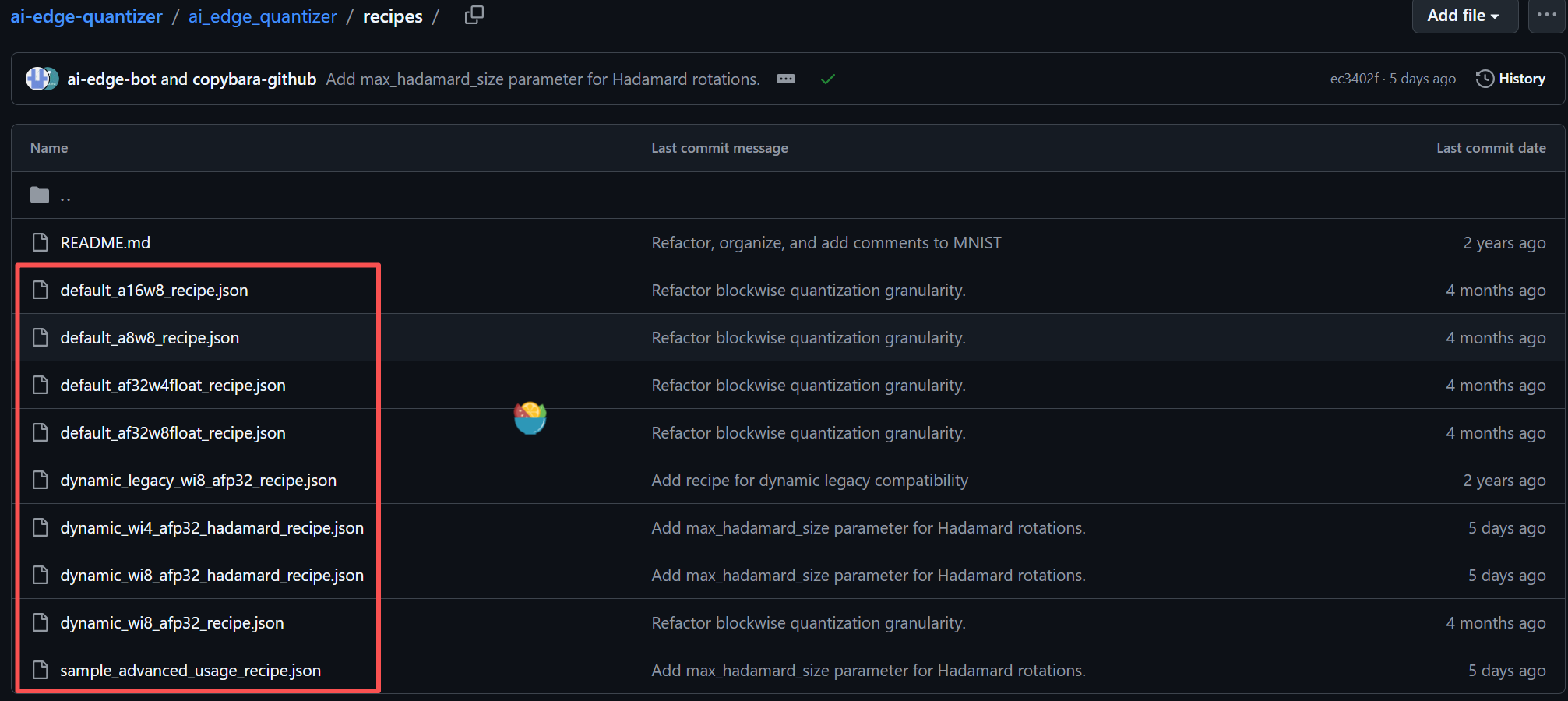
-rw-rw-r-- 1 pavelhan pavelhan 44842968 Mar 30 09:04 yolov8s_fp32.tflite除了以上的wi8-afp32量化模式,ai-edge-quantizer还支持其他的量化模式,如下图所示,Google 的工程师用了一种非常直白的命名约定来定义这些量化模式:
- w = Weight(权重参数,即模型训练出来的固定参数)
- a = Activation(激活值,即模型在推理时流动的中间特征图)
- i8 / i4 = 8位 / 4位整数(Integer)
- fp32 = 32位浮点数(Float)
推理测试
基于 LiteRT模型文件已经转换并量化完成,下一步就是在PC端的LiteRT runtime中对其进行推理测试。
如上所述,在 LiteRT生态中,ai-edge-litert包对应于之前的 tflite-runtime,也就是负责在 Android 或 PC 上基于LiteRT模型文件执行前向推理的运行时框架。因此,在PC端进行前向推理的流程大致也就是:加载模型以及推理的图片文件→数据预处理→执行推理→对推理结果执行NMS后处理→把NMS过滤的结果叠加在输入图像上。
import numpy as np
import cv2
import ai_edge_litert.interpreter as litert

def nms(boxes, scores, threshold=0.45):
    if len(boxes) == 0: return []
    x1, y1, x2, y2 = boxes[:, 0], boxes[:, 1], boxes[:, 2], boxes[:, 3]
    areas = (x2 - x1) * (y2 - y1)
    order = scores.argsort()[::-1]
    keep = []
    while order.size > 0:
        i = order[0]
        keep.append(i)
        xx1 = np.maximum(x1[i], x1[order[1:]])
        yy1 = np.maximum(y1[i], y1[order[1:]])
        xx2 = np.minimum(x2[i], x2[order[1:]])
        yy2 = np.minimum(y2[i], y2[order[1:]])
        w = np.maximum(0.0, xx2 - xx1)
        h = np.maximum(0.0, yy2 - yy1)
        inter = w * h
        ovr = inter / (areas[i] + areas[order[1:]] - inter)
        inds = np.where(ovr <= threshold)[0]
        order = order[inds + 1]
    return keep

# 1. 初始化模型
interpreter = litert.Interpreter(model_path="yolov8s_dynamic_int8.tflite")
#interpreter = litert.Interpreter(model_path="yolov8s_fixed.tflite")
interpreter.allocate_tensors()
input_idx = interpreter.get_input_details()[0]['index']
output_idx = interpreter.get_output_details()[0]['index']

# 2. 预处理
img_raw = cv2.imread("bus.jpg")
h_ori, w_ori = img_raw.shape[:2]
img = cv2.resize(img_raw, (640, 640))
input_data = img.astype(np.float32) / 255.0
input_data = np.transpose(input_data, (2, 0, 1)) # HWC -> CHW
input_data = np.expand_dims(input_data, axis=0)

# 3. 执行推理
interpreter.set_tensor(input_idx, input_data)
interpreter.invoke()
output = interpreter.get_tensor(output_idx)[0] # Shape: (84, 8400)

# 4. 后处理 (Post-processing)
output = output.transpose() # (8400, 84)
boxes = output[:, :4]
scores = np.max(output[:, 4:], axis=1)
class_ids = np.argmax(output[:, 4:], axis=1)

# A. 阈值初筛
mask = scores > 0.25
boxes, scores, class_ids = boxes[mask], scores[mask], class_ids[mask]

# B. 坐标转换: [cx, cy, w, h] -> [x1, y1, x2, y2]
x_center, y_center, w, h = boxes[:, 0], boxes[:, 1], boxes[:, 2], boxes[:, 3]
x1 = (x_center - w / 2) * (w_ori / 640)
y1 = (y_center - h / 2) * (h_ori / 640)
x2 = (x_center + w / 2) * (w_ori / 640)
y2 = (y_center + h / 2) * (h_ori / 640)
combined_boxes = np.stack([x1, y1, x2, y2], axis=1)

# C. 执行 NMS
keep_indices = nms(combined_boxes, scores, threshold=0.45)
final_boxes = combined_boxes[keep_indices]
final_scores = scores[keep_indices]
final_classes = class_ids[keep_indices]

# 5. 可视化并保存
for box, score, clsid in zip(final_boxes, final_scores, final_classes):
    x1, y1, x2, y2 = box.astype(int)
    # 画框
    cv2.rectangle(img_raw, (x1, y1), (x2, y2), (0, 255, 0), 2)
    # 标签
    label = f"ID:{clsid} {score:.2f}"
    cv2.putText(img_raw, label, (x1, y1 - 10), cv2.FONT_HERSHEY_SIMPLEX, 0.5, (0, 255, 0), 2)

cv2.imwrite("detection_result.jpg", img_raw)
print(f"检测完成,结果已保存至 detection_result.jpg,共发现 {len(keep_indices)} 个目标。")
参考资料
- AI Edge Torch: High Performance Inference of PyTorch Models on Mobile Devices - Google Developers Blog
- Convert Models From Pytorch to TFLite With AI Edge Torch | by David Cochard | ailia Tech BLOG (EN) | Medium
- https://github.com/google-ai-edge/litert-torch/blob/main/docs/pytorch_converter/README.md
- https://github.com/google-ai-edge/ai-edge-quantizer